
November 9, 2026
Bruno, K9s, and Herdr: Three Tools That Earned a Spot in My Workflow
Every few months I try a handful of new dev tools, and almost all of them are gone a week later. These three stuck. They're Bruno, K9s, and Herdr, and they cover pretty different parts of my day: testing APIs, poking at Kubernetes clusters, and running AI coding agents. Looking back, they have a few things in common. They're open source, they don't need an account, and they keep me on the keyboard instead of clicking around a web dashboard. Here's what each one does and how I actually use it.
Bruno: an API client that lives in your repo
If you've used Postman, you already get the basic idea of Bruno. You build requests, save them in collections, switch between environments, and hit send. The difference is where everything lives.
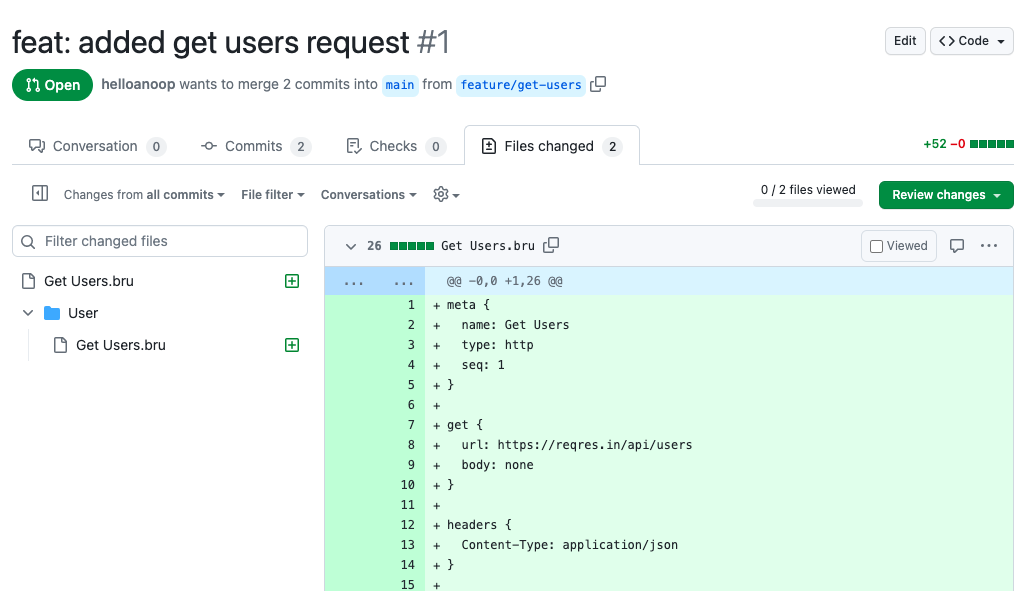
Postman pushes you toward its cloud. You sign in, your collections sync to their servers, and sharing with a teammate means inviting them into a workspace. Bruno skips all of that. A collection is just a folder of plain text files on your machine, one file per request. There's no account to make and nothing syncing in the background.
That sounds like a small detail, but it changes how you work. Because the collection is just files, I keep it in the same git repo as the project. When I add an endpoint, the request that tests it goes into the same commit. When someone reviews the pull request, they see the API change and the request change side by side. And when someone new joins, they clone the repo and already have every request, ready to go. No more "can you export your Postman collection and send it to me."
Environments work the way you'd expect. I usually have a local one, a staging one, and a production one, with things like the base URL and tokens stored as variables. Secrets stay out of the committed files, so you can share the collection without sharing your keys.
You can also script requests. A pre-request script can grab a fresh auth token, and a post-response script can pull a value out of the response for the next request, or check that the response looks right. Pair that with the Bruno CLI ("bru run") and the same collection you click through by hand can run as a test suite in CI. That's the part that won me over. The requests I write while building a feature turn into checks that keep running long after I've moved on.
K9s: Kubernetes without typing kubectl a hundred times
Anyone who has worked with Kubernetes knows the routine. Get pods. Copy a pod name. Describe it. Get the logs. Realize it restarted and the name changed. Get pods again. None of it is hard, it's just a lot of typing to answer simple questions.
K9s is a terminal UI that sits on top of your cluster and watches it for you. You open it and you're looking at a live list of pods that updates on its own, with status, restarts, CPU, and memory right there. Everything is a keystroke away. Type a colon and a resource name, like ":deploy" or ":svc", to jump to that view. Hit slash to filter. Select a pod and press "l" for logs, "d" to describe it, or "s" to open a shell inside the container. Port forwarding, scaling, and restarting a deployment are only a couple of keys too.
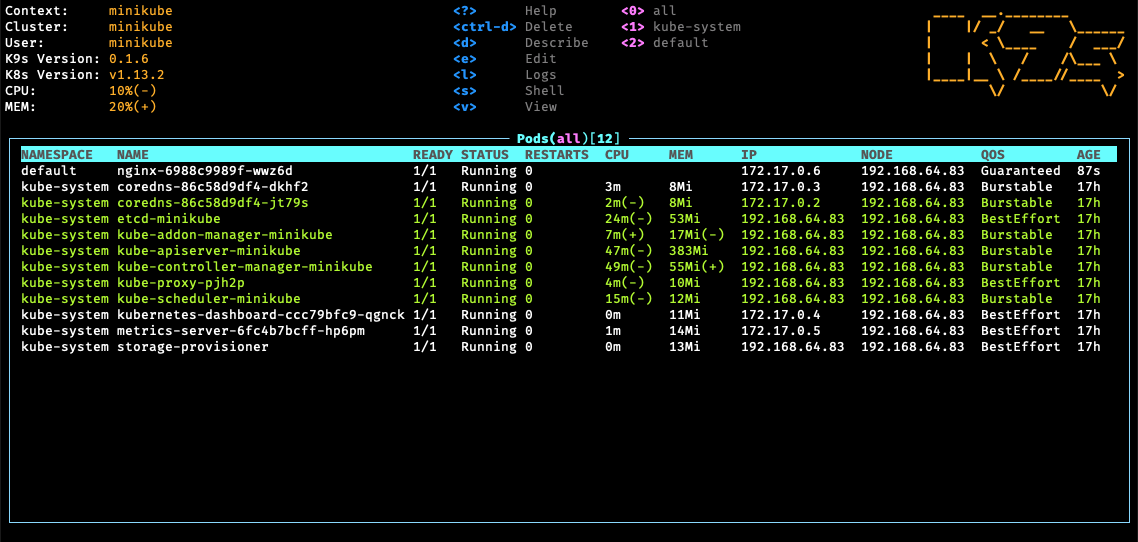
What I like most is how fast it makes the boring questions. Why is this pod crashing? Which deployment owns it? Is the service actually pointing at it? In K9s that's a few seconds of moving around instead of a few minutes of copying names between commands. There's also an XRay view that shows how resources connect to each other, and a Pulses view that gives you a quick health check of the whole cluster. Switching clusters is just ":ctx", which is handy when you're bouncing between a local cluster and a shared one.
One habit I'd recommend: if you're looking at a cluster you shouldn't be changing, launch it with "k9s --readonly". When everything is one keystroke away, it's way too easy to delete the wrong thing.
Herdr: a home for my AI coding agents
This is the newest one for me, and honestly the one I use the most now.
A lot of my coding happens alongside AI agents like Claude Code these days. The problem is that one agent quickly turns into three. One is refactoring, one is writing tests, and there's a dev server and a log tail running in between. In a normal terminal that becomes a mess of windows and tabs, and I keep checking each one to see if it's done or stuck waiting for me to approve something.
Herdr is a terminal workspace built for exactly this. You organize things into workspaces, tabs, and panes, a lot like tmux. The difference is that Herdr knows when an agent is running in a pane, and it can tell whether that agent is working, finished, or blocked waiting on you. So instead of checking every pane, I glance at the sidebar and see which one needs me.
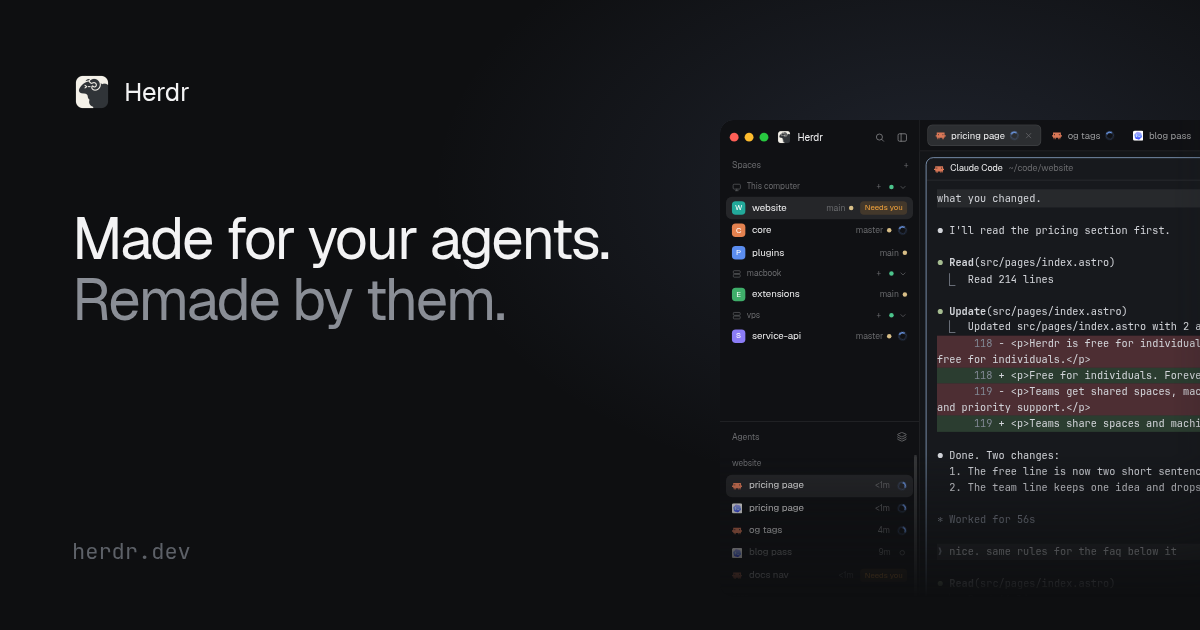
Sessions stick around too. Herdr runs a small server in the background, so if I close the window or detach, everything keeps running and I can come back to it exactly how I left it. It can even attach to a session on another machine over SSH.
The part I find most interesting is that Herdr has a CLI the agents themselves can use. I've set up Claude Code so that when it needs to run something long, like a dev server, a test suite, or a build, it splits off a new pane and runs it there instead of hiding it in the background. I can watch the output as it happens, and the agent can read that same output back to check whether the tests passed. It can even start a second agent in its own pane and hand it a task. That turns "the AI is doing something somewhere" into "I can see exactly what the AI is doing," and that matters a lot more than I expected.
What they have in common
Put the three side by side and the pattern is pretty clear. They're all local first, and they keep things as files or terminals I can see instead of hiding them behind a web dashboard. Bruno keeps my API requests in git. K9s puts a whole cluster on one keyboard-driven screen. Herdr turns a pile of mystery windows into agents I can actually keep track of.
For a small studio like ours, that matters. Clients never see these tools, but they feel the difference. APIs get tested the same way every time, problems in a cluster get spotted faster, and AI-assisted work stays something I can watch and check. None of it is flashy. It just means fewer surprises, and that's most of what good engineering comes down to.
All three are free to try. If any of them sound useful, start with whichever one matches the thing that annoys you most right now.